在durpal系統裡,如何讓不同的feeds,import時,來更新同一筆node的資料?
終於找到解法了~
好開心,不用自己去追程式碼,不用去寫自己的功能,而且找到更好的方法來解決這個問題。
主要是在這一篇,第159個comment看到的。
https://drupal.org/node/661606
假如我英文沒看錯的話,它的意思有3個:

ci,yii,symfony,laravel,cakephp?該用哪一套 php framework呢?
因為開發上的懶,再加上大部份主機空間,都是以php為最便宜的方式,所以轉到了php的世界,這二年用了ci之後,就懶的找其它的php framework。
在某天和朋友聊天後,才得知ci在找人接手,也就停止了維護,消息來源如下:
ellislab-seeking-new-owner-for-codeigniter
因為ci是open source,當然是可以繼續用,只是之後就要自己修改有問題的地方了。
為了之後長久的發展,我想,還是找個其它的替代方案好了,
但該找哪一套呢?查來查去,php framework還真多套耶~
來google trend一下,看看幾套被查詢的次數的歷史紀錄,也許可以做為一個參考方向。
搜尋的熱門度:codeigniter, yii, symfony, laravel, cakephp - 全球, 2004年至今
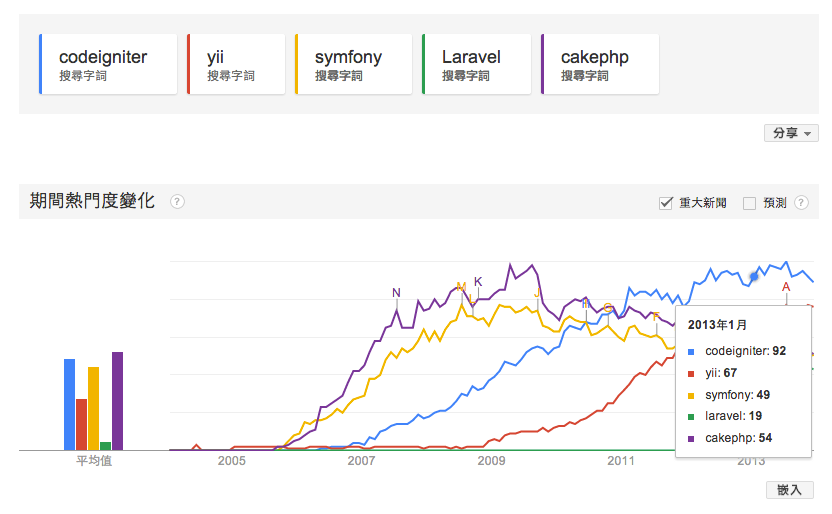
根據這個結果,除去ci,也許下一套用Yii是個不錯的方案,Laravel也是個蠻有潛力的樣子喔!
如何 在 MacBook Pro 錄制 WMV 的 線上radio?
今天有個朋友上想要把某時段的廣播節目錄製下來,嗯,這時候就要看宅男超能力來大顯神威的時候(超人手勢)
在價格和便利性的考慮之下,選擇了VLC Media Player,話不多說,來看看如何錄制囉~
下載VLC:http://www.videolan.org/vlc/
安裝後,打開VLC,FILE -> Streaming/Exporting Wizard...
然後請看下面的圖示囉~
GAE抓取網頁的方法?
原本習慣用snoopy來抓取網頁的資料,但上到GAE平台後,不知為何會出現底下的錯誤??
PHP Warning: fsockopen(): php_network_getaddresses: gethostbyname failed.
PHP Warning: fsockopen(): unable to connect to xxxx.com:80 (php_network_getaddresses: gethostbyname failed. errno=0)
GAE如何存取memcache的服務呢?
GAE提供了很多的服務,其中一個就是memcache,
在GAE平台中使用memcache,不用include任何檔案,它是可以直接呼叫的喔~
底下是簡單的使用範例:
GOOGLE APP ENGINE(GAE) 支援 php 囉!但什麼是GAE呢?
Google App Engine (GAE) 終於支援php囉~
其實這是己經很早的新聞了,但小弟孤聞寡陋,到現在才知道(遜掉了)
開發手冊如下:
https://developers.google.com/appengine/docs/php/config/appconfig
GAE是什麼呢?
簡單說,就是您可以不用擔心主機硬體資源,不用擔心程式執行環境,不用擔心同時間有多少人使用,
MAC PRO 的 ATM讀卡機就掛點不能用了!為什麼不能抓到呢?
我用的這台MAC,終於可以升級了,從10.6升到10.9,好開心apple也讓它的os免費了。
(最好是連pc都能免費安裝)
不過升級後,就出現了一些問題,今天的問題是:
ATM讀卡機就掛點不能用了!
我又急著繳上費,怎麼辦??只好尋求google大神!
廢話不多說,解法如下:
如何在終端機底下,取得server對外的ip(text-only)
有時候,用指令真的比較快,又方便,今天紀錄一下,如何在終端機底下,取得server對外的ip(text-only):
curl ip-addr.es
curl checkip.dyndns.com
curl ip-addr.es
curl checkip.dyndns.com
如何在ubuntu底下使用網路atm呢?
如何在ubuntu底下使用網路atm呢?
網路己經有很多解答了,重點整埋如下:
- 安裝drivers
- 安裝firefox
- 安裝firefox-pluging for 玉山銀行的webATM
ubuntu之VI的上上下下左右左右BA
今天重灌完ubuntu後,vi在editor模式時,上下左右鍵竟然失去功能,怎麼按都會出現ABCD,backspace也沒有效了方法,怎麼辦??
後來發現最簡單的,就是在自己的家目錄下,新增一個檔案,$HOME/.vimrc,裡頭加入3行:
set nocompatible
set backspace=indent,eol,start
set bs=2
這時再使用vi就正常囉~
ubuntu 如何安裝 spotify 呢?
ubuntu 如何安裝 spotify 呢?
執行底下的指令即可:
sudo add-apt-repository http://repository.spotify.com stable non-free
sudo apt-key adv --keyserver keyserver.ubuntu.com --recv-keys 94558F59
sudo apt-get update
sudo apt-get install spotify-client
請參考:
https://www.spotify.com/tw/download/previews/
ubuntu 中,如何産生.desktop的檔案呢?
.desktop副檔名的檔案,是可以放在桌面上,來啟動應用程式地~(看起來是,沒有認真研究)
os:ubuntu 13.xx
執行底下指令:
gnome-desktop-item-edit xxxxx.desktop --create-new
xxxxx.desktop 就是您要建立的檔名
建立好後,再copy到您桌面上,就可以用滑鼠click它囉~
可參考底下這一篇:
http://askubuntu.com/questions/67925/how-to-create-a-desktop-shortcut-in-unity
xxxxx.desktop這個檔案,其實是個純文字檔,裡頭設定啟動時需要的資訊,
可參考底下這篇:
https://help.ubuntu.com/community/UnityLaunchersAndDesktopFiles
Regex 正規表示式 之神奇解說器
今天看到這一個網站,真是太神奇了~
以後可以把所看到的"Regex 正規表示式"都丢進去試看看囉~
http://www.regexper.com/
 |
| regexper 的網站樣子 |
Drupal Views 的 RSS 的 RFC2822
在Drupal中要自訂産生的rss內容時,需要有個“日期”,而且日期格式為 RFC2822
在此紀錄一下相關資料,免得又忘了!
RFC2822 format string :
D, d M Y H:i:s O
php date format string 說明:
http://us2.php.net/manual/en/function.date.php
php 相關的function:
date(DateTime::RFC2822)
date_parse_from_format
ubuntu + drupal + apache solr
**需要先安裝java環境:
apt-get install sun-java6-jre sun-java6-plugin sun-java6-fonts
**下載 apache solr:
http://www.apache.org/dyn/closer.cgi/lucene/solr/4.5.1
解壓縮,出現目錄,solr-4.5.1
cd solr-4.5.1/example
java -jar start.jar
就可以啟動solr server囉~
(因為solr有內建jetty)
查看 solr 狀態 - http://您的server:8938/solr
**加入中文分詞功能:
https://code.google.com/p/ik-analyzer/
下載 IK Analyzer 2012FF_hf1.zip
解壓縮,出現目錄,IK Analyzer 2012FF_hf1
cd IK Analyzer 2012FF_hf1
cp IKAnalyzer.cfg.xml solr-4.5.1/example/etc
cp stopword.dic solr-4.5.1/example/etc
cp yours.dic solr-4.5.1/example/etc
vi solr-4.5.1/example/solr/collection1/conf/schema.xml
修改或加入底下設定:
< fieldType name="text" class="solr.TextField" >
< analyzer class="org.wltea.analyzer.lucene.IKAnalyzer"/ >
< /fieldType >
**Drupal 要加入二個model:
search api - https://drupal.org/project/search_api
search api solr search - https://drupal.org/project/search_api_solr
完成~
MAC OS 上 php 連結到mysql時,出現錯誤訊息:SQLSTATE[HY000] [2002] No such file or directory in lock_may_be_available
mac os 更新後,有些東西會出現error,尤其是server相關的設定檔,都變回出廠時的預設值了。
今天php連到mysql時,出現底下的問題:
The website encountered an unexpected error. Please try again later.
Error messagePDOException: SQLSTATE[HY000] [2002] No such file or directory in lock_may_be_available() xxxxxxxxxxxxxxx.
這問題,主要是pdo這個driver找不到mysql.sock
在 /private/etc/php.ini裡頭有個參數,指定到/tmp/mysql.sock:
pdo_mysql.default_socket=/tmp/mysql.sock
設定好,重新啟動apache即可
(# sudo apachectl restart)
ps:為什麼會在/tmp裡頭,我也不知,只是看到別人這樣設定,而我的/tmp底下也有個mysql.sock,試一下就成功了
今天php連到mysql時,出現底下的問題:
The website encountered an unexpected error. Please try again later.
Error messagePDOException: SQLSTATE[HY000] [2002] No such file or directory in lock_may_be_available() xxxxxxxxxxxxxxx.
這問題,主要是pdo這個driver找不到mysql.sock
在 /private/etc/php.ini裡頭有個參數,指定到/tmp/mysql.sock:
pdo_mysql.default_socket=/tmp/mysql.sock
設定好,重新啟動apache即可
(# sudo apachectl restart)
ps:為什麼會在/tmp裡頭,我也不知,只是看到別人這樣設定,而我的/tmp底下也有個mysql.sock,試一下就成功了
升級到 mac os x 10.9 Mavericks,結果之前裝的opencc又不能跑了
今天升級到 mac os x 10.9 Mavericks,結果之前裝的opencc又不能跑了,再來檢查一次,問題和之前的不一樣,只好紀錄下來:
1.執行phpize時,出現:
$ phpize
grep: /usr/include/php/main/php.h: No such file or directory
grep: /usr/include/php/Zend/zend_modules.h: No such file or directory
grep: /usr/include/php/Zend/zend_extensions.h: No such file or directory
Configuring for:
PHP Api Version:
Zend Module Api No:
Zend Extension Api No:
解法:這要先執行底下一個指令,安裝xcode的東東:
$ xcode-select --install
1.執行phpize時,出現:
$ phpize
grep: /usr/include/php/main/php.h: No such file or directory
grep: /usr/include/php/Zend/zend_modules.h: No such file or directory
grep: /usr/include/php/Zend/zend_extensions.h: No such file or directory
Configuring for:
PHP Api Version:
Zend Module Api No:
Zend Extension Api No:
解法:這要先執行底下一個指令,安裝xcode的東東:
$ xcode-select --install
訂閱:
文章 (Atom)